


Help:Basic guide to editing on Appropedia
This guide has been created to provide users with the necessary instructions to start contributing to this shared knowledge repository. Through it, you will learn to handle the fundamental tools for editing content, from creating a user account to inserting images or videos, editing text, and using essential templates for proper documentation.
These skills will allow you to collaborate effectively in building and improving articles, strengthening the positive impact that the Appropedia community has on developing sustainable solutions globally.
Creating a user account
[edit | edit source]- Visit Appropedia: Go to Appropedia.
- Register:
- Click on "create account" in the top right corner.
- Fill in the required fields: username, password, email, etc.
- Verify your email if necessary to complete the registration.
Creating a new page
[edit | edit source]- Search for a title: Ensure that a page with your desired title doesn't already exist by searching on Appropedia.
- Create a page:
- If it doesn't exist, go to the menu located in the top left corner.
- Select the "new page" option and start editing.
Editing text
[edit | edit source]Appropedia, like all wikis, allows you to edit almost any page. It's super easy; just click the Edit button. If you make a mistake, don't worry; you can always revert any edit by clicking undo in the page history.
There are two main ways to edit pages: the visual editor and the source editor.
- Visual editor: generally easier and often sufficient. If you choose "edit", you'll use the visual editor, which is similar to a word processor. Just select the text and apply formats (bold, italics, etc.).
- Source editor: learning the source editor gives you finer control over the final result and is essential for more advanced editing. If you choose "edit source", you'll see the source code in wikitext. Here you can use tags like
''Italic text''or'''Bold text'''.
For more detailed information, you can visit the following link.
Visual content
[edit | edit source]Inserting a main image
[edit | edit source]Upload image:
- Click on "upload file" in the left-hand menu.
- Select the file from your device and fill in details like file name, description, and license.
Insert image into a page:
- In the editor, use the "+" > "images and media" button.
Inserting a gallery
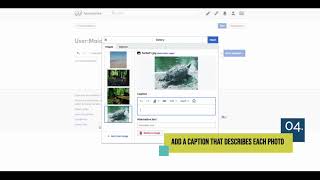
[edit | edit source]- Upload images: ensure you've previously uploaded the images you want to include in the gallery (see the "inserting a main image" step).
- Insert the gallery: Select "+" > "gallery" and add the images you want. You can adjust the number of columns and the size of the images according to your preferences.
Inserting a template
[edit | edit source]A template is an element that can be reused across multiple pages.
Templates can be complex but are highly valuable for:
- Reusing elements on several pages (e.g.,
Template:Button,Template:References needed). - Providing standard formatting for elements (e.g.,
Template:Video). - Displaying notices on pages to notify users or help maintain pages (e.g.,
Template:Notice).
You can view all available templates in Category:Templates.
How to add a template to a page
[edit | edit source]- Edit the page.
- Go to the location where you want to insert the template.
- Click on + > template.
- Search for the desired template.
- Fill in the required or optional parameters.
- Click insert.
Examples of commonly used templates
[edit | edit source]Use this template to add structured information to content pages.
Use this template to add structured data to organization pages.
Use this template to add structured data to project pages.
Saving changes
[edit | edit source]- Review: before saving, review your changes to ensure everything is correct.
- Save:
- Click on "save changes",
- Add a brief summary of the changes made.
- If it's a minor edit, check the "minor edit" box.
- Click "save changes" to finalize.
More information
[edit | edit source]For detailed information on how to edit in Appropedia you can check the help box:
Other resources
[edit | edit source]



| License | CC-BY-SA-4.0 |
|---|---|
| Cite as | Paola María Moreno (2025). "Help:Basic guide to editing on Appropedia". Appropedia. Retrieved October 23, 2026. |