Other resources



| License | CC-BY-SA-4.0 |
|---|---|
| Cite as | Paola Moreno (2025). "Help:Basic guide to editing on Appropedia". Appropedia. Retrieved October 3, 2026. |
This guide has been created to provide users with the necessary instructions to start contributing to this shared knowledge repository. Through it, you will learn to handle the fundamental tools for editing content, from creating a user account to inserting images or videos, editing text, and using essential templates for proper documentation.
These skills will allow you to collaborate effectively in building and improving articles, strengthening the positive impact that the Appropedia community has on developing sustainable solutions globally.
Appropedia, like all wikis, allows you to edit almost any page. It's super easy; just click the Edit button. If you make a mistake, don't worry; you can always revert any edit by clicking undo in the page history.
There are two main ways to edit pages: the visual editor and the source editor.
''Italic text'' or '''Bold text'''.For more detailed information, you can visit the following link.
Upload image:
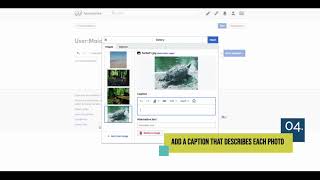
Insert image into a page:
A template is an element that can be reused across multiple pages.
Templates can be complex but are highly valuable for:
Template:Button, Template:References needed).Template:Video).Template:Notice).You can view all available templates in Category:Templates.
Use this template to add structured information to content pages.
Use this template to add structured data to organization pages.
Use this template to add structured data to project pages.
For detailed information on how to edit in Appropedia you can check the help box:
| License | CC-BY-SA-4.0 |
|---|---|
| Cite as | Paola Moreno (2025). "Help:Basic guide to editing on Appropedia". Appropedia. Retrieved October 3, 2026. |