


Swetman Makerspace INFO Prusa 3D printers

| Authors | Lonny Grafman Emilio Replace with your accounts |
|---|---|
| Location | Arcata, United States |
| Status | Deployed |
| Made | Yes |
| Replicated | No |
| Uses | education, science |

This project was made in [] to provide easy access to information about the settings to Cal Polytechnic Humboldt students, inurn reducing the amount of waste being produced by failed prints. This is achieved through a singular segmented video from transporting a STL file to the Pursa 3D printer Software to installing the filament onto the printers themselves. Along with the video a display with a ledger helps to visually give students a quick estimation on what type of settings would work best with their project with the addition of a poster with simple reminders.
Background
[edit | edit source]At the Cal Poly Humboldt Sweatman Makerspace, our client Matt needed alternative supplementary resources to inform users on how the settings of the Pursa 3D printers change and effect the print by the end of Spring 2025 semester. Previously, there was no readily available information to guide students on how to operate the Prusa 3D printers. To address this, we set out to create a variety of accessible resources designed to clearly and effectively help students get started with 3D printing. Our goal was to make the process less intimidating and more approachable for beginners.
Problem statement
[edit | edit source]Previously, there was no readily available information to guide students on how to operate the Prusa 3D printers in the Swetman Makerspace. To address this, we set out to create a variety of accessible resources designed to clearly and effectively help students get started with 3D printing. Our goal was to make the process less intimidating and more approachable for beginners, as well as reduce waste from failed prints and keep costs down.
Criteria
[edit | edit source]This Criteria was created by the needs of the client Matt of Cal Polytechnic University Humboldt Sweatman Makers space needs.
| Criteria | Description | Weight (1-10) |
|---|---|---|
| Video | Shows a step by step informational video with segmented sections. | 10 |
| Display | A physical display of prints that reveal what can be made with the printers as well as settings for the prints. | 9 |
| Signage | Eye catching and simple signee that fits next to the printers and gives quick reminders on the usage of 3D printers. | 7 |
| Colorful / Cool | Presentable and how pretty the project must look. | 5 |
Prototyping
[edit | edit source]This is our initial prototype of the Zen Garden display. We constructed the container out of cardboard, to approximate the desired final dimensions. Inside are notecards that portray models we wanted to include in the final display, along with some example prints. The pamphlet pictured resembles the legend that will be included in the final display, in order for people to easily locate what prints are made from what type of material, and the settings that were used.
- Sample gallery
-
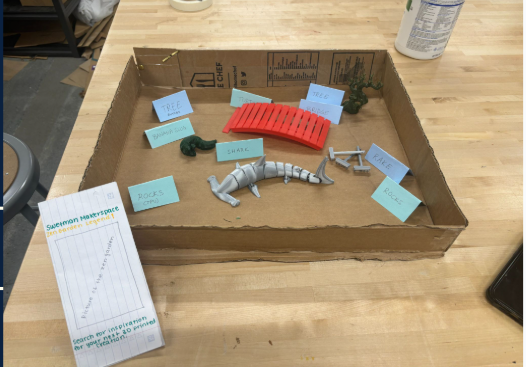 Draft of 3D Display

Final product
[edit | edit source]Our final project is constructed into three different elements to convey the information of how to use the Prusa 3D printers clearly and effectively.
1) Detailed Video
Our video, titled ____, is available on YouTube and runs approximately ___ minutes. It’s divided into clearly labeled sections which are only a few minutes long, making it easy for users to jump directly to the topics they’re most interested in. We recommend watching this video first to gain a foundational understanding of 3D printing, which will help users get started with greater confidence and ease.
2) Visual and Tactile Display
We created two complementary displays: a Zen garden for visual engagement and a bucket of 3D-printed fidget toys for a tactile experience. The Zen garden is designed to showcase the range of prints that can be made using Prusa 3D printers, highlighting variations in filaments and print settings. The fidget toy bucket offers hands-on examples, allowing users to feel the textures and compare the durability of different materials and configurations. Together, these displays aim to provide both visual and physical understanding of 3D printing capabilities.
3) Signage
Our sign is displayed next to the Prusa 3D printers in the Makerspace, making it easily visible and accessible for users. It features a simple, numbered list of key steps to keep in mind when preparing for 3D printing. The goal of this sign is to set users up for success by helping them avoid common mistakes that could compromise their prints. We hope these reminders will contribute to a smoother and more effective printing process.
Construction
[edit | edit source]A very complete description of how the final project is built. This large section should have lots of pictures. Use the Help:Images#Galleries and probably Template:Steps (e.g. Barrel O' Fun Worm Bin Instructions).
- Sample gallery
-
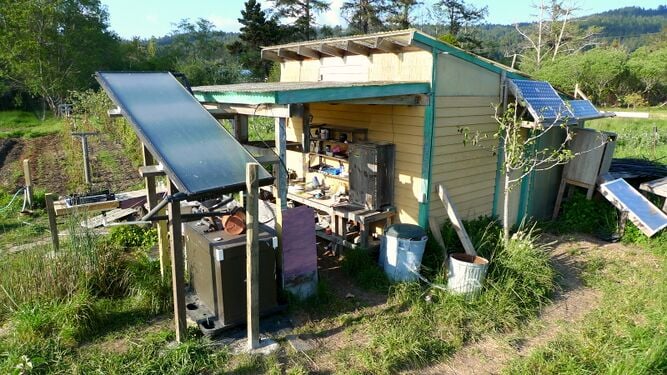 Sample caption text.
 -
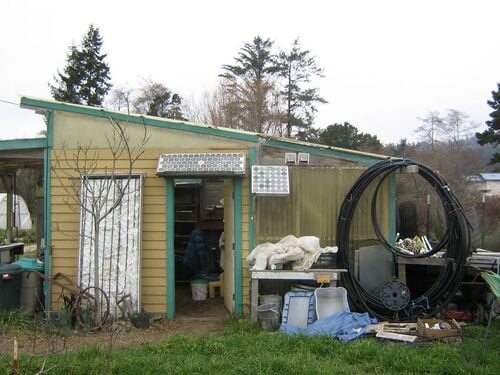 More sample caption text. This would look better with different images.:)
 -
 Even more sample caption text.


Video instructions
[edit | edit source]A good way to display a process is by making a video explaining your process. See Template:Video for information on how to add and annotate videos.
Bill of materials
[edit | edit source]| Item | Amount | Cost per unit | Total |
|---|---|---|---|
| Wooden board — [Dimensions] | 1 | USD 20.00 | USD 20.00 |
| Acrylic panel — [Dimensions] | 1 | USD 30.00 | USD 30.00 |
| Grand total | USD 50EUR 43.00 <br />GBP 36.50 <br />CAD 62.00 <br />MXN 1,042.50 <br />INR 3,742.50 <br /> | ||
Operation
[edit | edit source]This is how to operate. It should have a brief introduction. You might want to show images or videos with step-by-step instructions when needed.

Remove the alligator clips from the red and black wires that attach to the solar panels by using the wire cutter

Strip about 3/8 inch of insulation off the solar panel wires by using the 10 or 12-gauge wire stripper (whichever fits better)
Maintenance
[edit | edit source]Introduce this maintenance section. Help ask the questions:
- Are there any needed actions for maintenance?
- How often?
- Who should perform maintenance?
Maintenance schedule
[edit | edit source]This is when to maintain what. Please keep the format the same as it populates the kiosk in CCAT.
- Weekly
- Check the bucket of 3D printed fidget toys for damage prints
- Check QR codes on the video for accurate links
- Print new QR codes if link for video has changed
- Monthly
- Reprint or create new 3D hand holdable prints to replace lost or damaged 3D printed fidget toys
- a monthly task
- Yearly
- Update video if settings and programs have changed ex. layout of settings, different program being used, new common errors
Conclusion
[edit | edit source]Testing results
[edit | edit source]Describe the testing results.
Discussion
[edit | edit source]Discuss the testing results.
Lessons learned
[edit | edit source]Discuss lessons were learned during this project and what you would do different next time.
Next time there needs to be a solid time when group members work on the project with a clear plan/ list of what is going to be done on what week, day , meeting that stays solid with extra time in meetings allowing group members to do other work unrelated to the project entailing that all group members meet up.
Next steps
[edit | edit source]Discuss any next steps for the project as it goes on into the future.
Additional 3D figures can be printed to show more cool projects as well as adding more prints that more closely represents what is commonly being printed.
Troubleshooting
[edit | edit source]| Problem | Suggestion |
|---|---|
| Foggy display | Wipe clear display with water and a rag. |
| Video link changed | Email_____ with a subtitle of "Video error Sweat Man Makers Space" with a humboldt.edu Email |
| Posters damaged | Email_____ with subtitle of "Damaged poster Sweat Man Maker Space" for PDF of poster to print out a new poster and a humboldt.edu Email |
Team
[edit | edit source]Introduce team and semester in the following format:
- Lonny Grafman
- Emilio Velis
- Fushao Lee (Dimin fishygod)
- Davis Handline (
- Addy Toll__ (
- Izzy Gallacci___(
References
[edit | edit source]
| License | CC-BY-SA-4.0 |
|---|---|
| Organizations | Cal Poly Humboldt |
| Cite as | Lonny Grafman, Isabellagallacci, Dimin fishygod (2025–2026). "Swetman Makerspace INFO Prusa 3D printers". Appropedia. Retrieved October 21, 2026. |