


Cosmos in the Stacks guess who

| Type | Interactive Display |
|---|---|
| Authors | Poppy Edge Alejandro Montalvo Ellie Palmer |
| Location | Arcata, California, United States |
| Status | Deployed |
| Years | 2026 |
| Made | Yes |
| Replicated | No |
| Uses | Education, Science |
The Cal Poly Humboldt Library needed an interactive display that could teach visitors about local wildlife. To solve this issue, we created a matching game display using accurate 3D printed animal tracks and scat that when correctly matched a directional speaker plays the sound of the animal matched and a picture, species name, and call number is displayed on an LCD screen. Display was designed and created in Spring Semester, 2026.
Background
[edit | edit source]Team Smooth Operators is a part of Cal Poly Humboldt's Introduction to Design Course (ENGR 205). Each semester students form groups that are then assigned a client and an issue to solve. Our client is the Cal Poly Humboldt Library which is implementing more interactive displays known as Cosmos in the Stacks. Our goal is to teach library visitors about local Humboldt County wildlife through a matching game of what they leave behind. This display was installed for the 2026 school year and will continue to be on display for 10 years.
Problem statement
[edit | edit source]The objective of this project is to encourage Cal Poly Humboldt Library visitors to learn more about local Humboldt County wildlife.
Criteria
[edit | edit source]This criterion was determined through the client's and users' needs. These served as the minimum requirements to be achieved by the final design. Each was used to choose the best fit solution.
| Criteria | Description | Weight (1-10) |
|---|---|---|
| Maintainability | No more than 5 minutes of maintenance is required per month. Lasts at least 10 years without looking worn out against possible misuse. | 10 |
| Aesthetics | Eye-catching once approached and easy to see animals. | 9 |
| Educational Value | Helps the average person learn about identification based on what many species of animals leave behind | 9 |
| Engagement | Accurate information that is engaging for a minimum of 5 minutes | 7 |
| Cost | Under $475 | 7 |
| Safety | Meets University standards for public safety | 5 |
Prototyping
[edit | edit source]Throughout the prototyping phase different types of arrangements as well as teaching options were tested and sorted through. Through this process we learned that certain animals weren't as important compared to others due to how common they were to the area. We also learned that too many eye-catchers became a distraction from the educational value.
- Prototypes
-
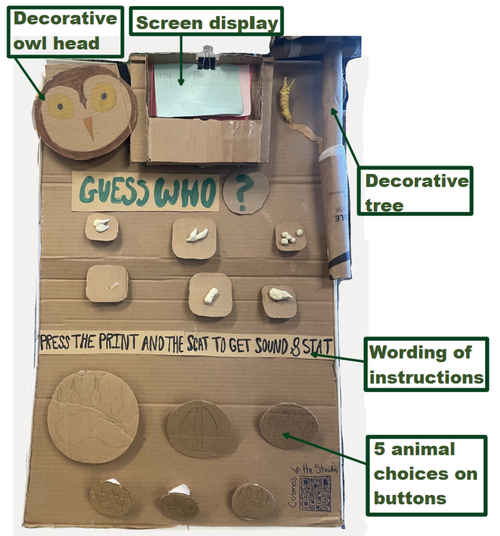 First Prototype made of cardboard, clay, and paper.
 -
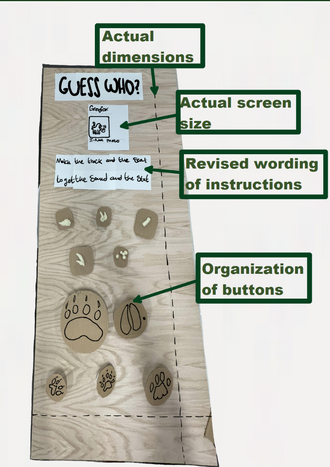 Second Prototype using cardboard, paper, and wood.


Final product
[edit | edit source]The Guess Who! board teaches visitors about the Grey Fox, Roosevelt Elk, Black Bear, River Otter, and Mountain Lion. Utilizing a game with the objective of correctly matching animal tracks to scat to get the animal correctly matched to appear on the screen as well as the sound of it to play. With accuracy in mind each scat was collected from our university's wildlife department archive and then 3D scanned.
3D Scanning Process
Using an Apple iPhone 15 that has the ability to take Lidar scans, the app Polycam was utilized to scan each scat used on this display. Each scat was placed on a blank white surface and carefully scanned from every angle. Once fully scanned, these .gltf files were converted to .stl files by a free online website called ImageToStl. The 3D printer used was a Prusa so these stl files were converted into .gcode through the Prusa slicer.
Coding
Utilizing a Raspberry Pi 4 and, more specifically, its default programming language Python and its paired open-source library, Pygame, each button on the board is given a value associated with an animal print and scat. When two buttons are matched together, the Raspberry Pi 4 will display a picture of the animal and what sound it makes on an LCD screen at the top of the board.
Construction
[edit | edit source]- How the Guess Who Display was made
-
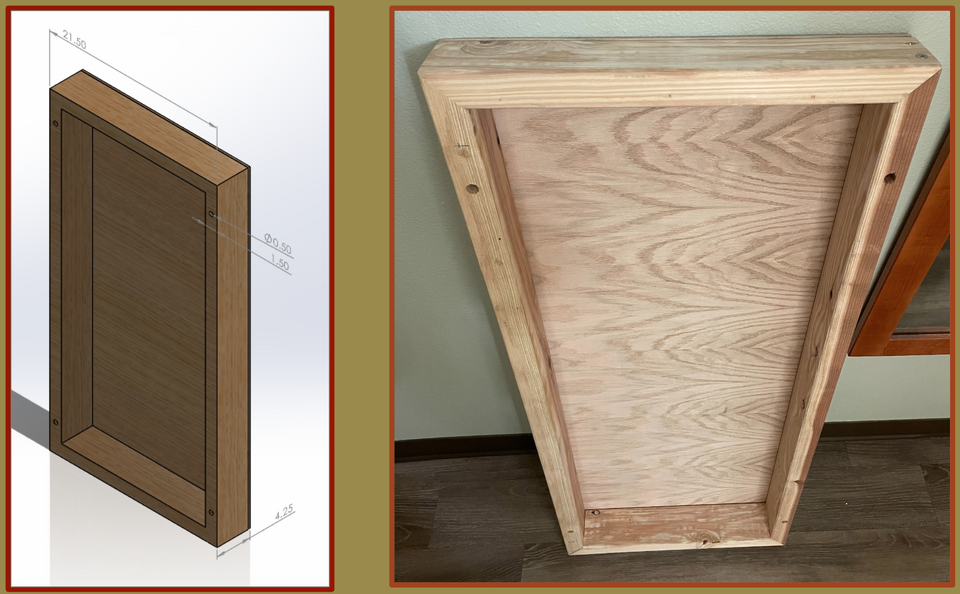 1: Using wood planks and 21x40" plywood sheet of 1/4" thickness the base is created to make room for wiring in the back. bolt holes are drilled into the 4 corners of the base to mount onto a endcap.
 -
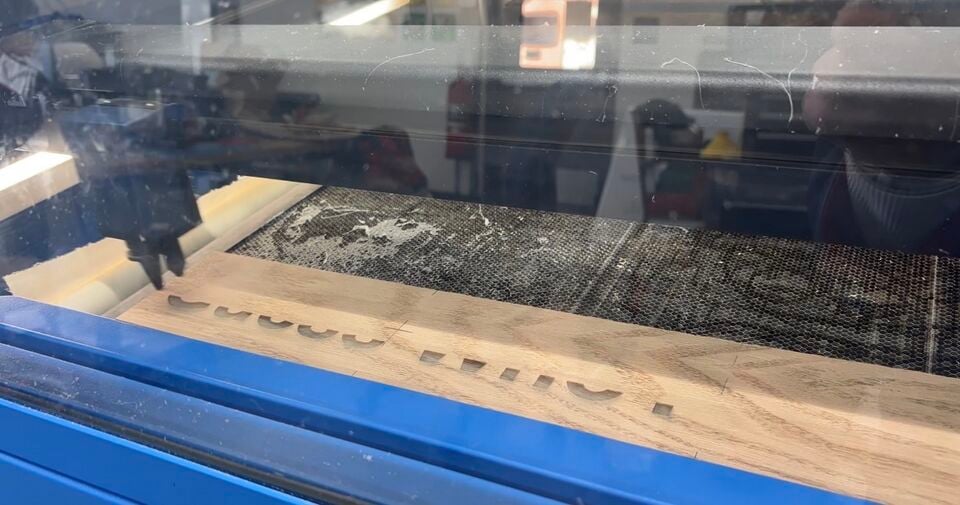 2: All titles and phrases were laser engraved into a thin piece of wood then cut to size and wood glued onto the wood base.
 -
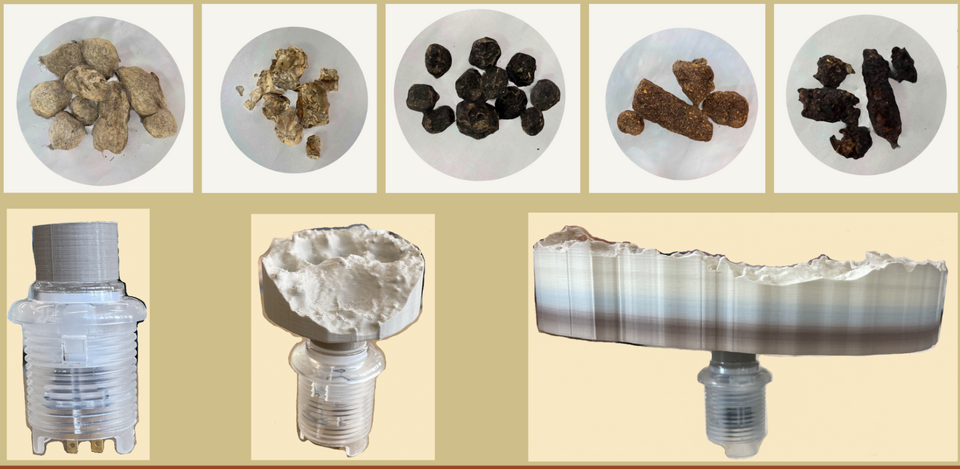 3: Arcade buttons are attached to 3D printed spacers using epoxy which are then attached to 3D printed scat or track replicas using a color gradient PLA to PLA glue. The 3D printed slicer photos can be seen above and the attachment methos below.
 -
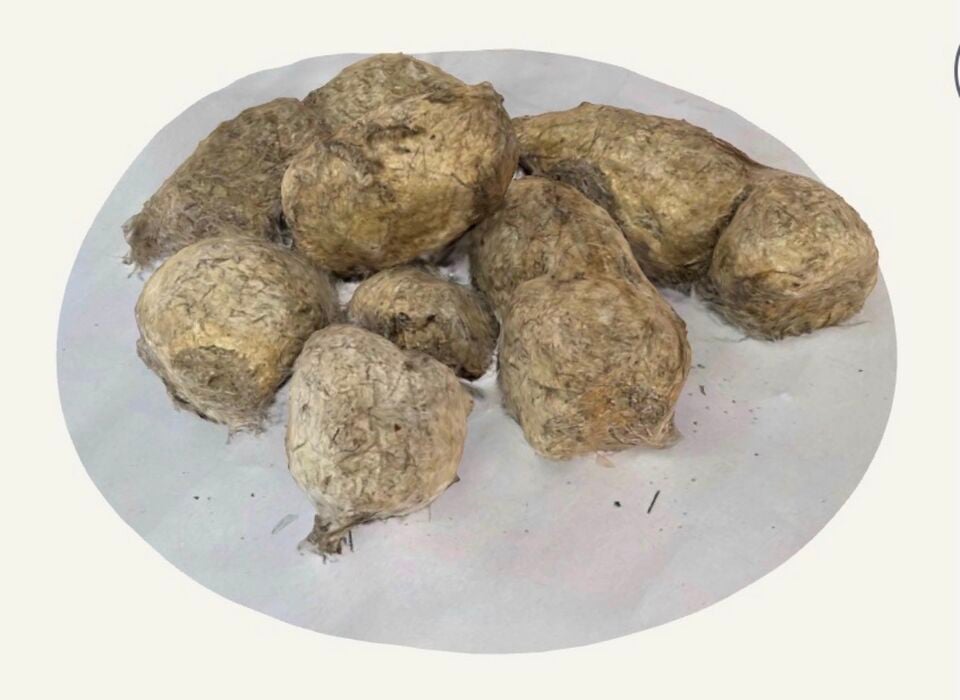 4: All scat buttons were 3D scanned using Polycam
 -
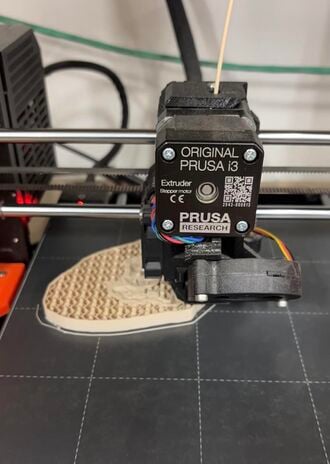 5: All buttons were 3D printed for accuracy, the .stl files for these are linked within this page.
 -
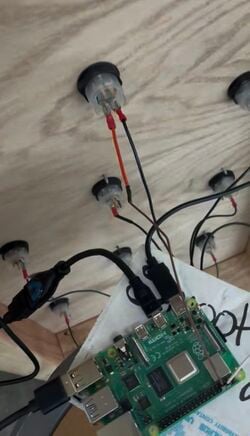 6: Wiring connecting the buttons to the Raspberry Pi, which is then connected to the screen and speaker. All receiving power from an outlet.


Guess Who Videos
[edit | edit source]These videos show the building process, operational instructions, and project objective.
Bill of materials
[edit | edit source]Each material ordered and used throughout the entire project process is within the table below.
| Item | Amount | Cost per unit | Total |
|---|---|---|---|
| Screen — Raspberry Pi Screen | 1 | USD 32.99 | USD 32.99 |
| Arcade Buttons — For the Game Aspect and long-lasting durability. | 10 | USD 2.50 | USD 25.00 |
| Color Changing PLA Filament — For 3D printing animal Scat and Track Buttons | 1 | USD 23.99 | USD 23.99 |
| Circuit Board — Raspberry Pi | 1 | USD 56.25 | USD 56.25 |
| Mount — Raspberry Pi Mount | 1 | USD 6.93 | USD 6.93 |
| Bolts — Mounting to the end cap of the bookshelf | 4 | USD 4.63 | USD 18.52 |
| Arcade Button Connectors — Connect Gpio input to buttons | 1 | USD 4.95 | USD 4.95 |
| USB 3.0 to 3.5mm jack — Connect speaker to Raspberry Pi | 1 | USD 5.99 | USD 5.99 |
| Bread Board — Solderless Wiring | 1 | USD 11.99 | USD 11.99 |
| LCD Screen — Display images and text | 1 | USD 32.99 | USD 32.99 |
| Wood — Wood Base | 1 | USD 27.85 | USD 27.85 |
| 4x3 Wood — Sides for the wood base | 2 | USD 4.66 | USD 9.32 |
| Screw Kit — To keep the sides of the board together | 1 | USD 5.50 | USD 5.50 |
| Epoxy — Gorilla 0.85 fl. oz for attaching the 3D prints to the arcade buttons | 1 | USD 5.68 | USD 5.68 |
| Directional Speaker — Used to project animal noise | 1 | USD 396.00 | USD 396.00 |
| Grand total | USD 663.95EUR 571.00 <br />GBP 484.68 <br />CAD 823.30 <br />MXN 13,843.36 <br />INR 49,696.66 <br /> | ||
Operation
[edit | edit source]
This is how you interact with the Guess Who Board!
Push the button you chose into the board
Choose the button of the opposite option. If a track was previously chosen, then click on a scat next or vice versa.
If matched correctly, the sound and a picture of the animal chosen will appear on the screen. If incorrect, an X will appear, and you will need to repeat the process of matching.
Maintenance
[edit | edit source]Very little maintenance should be required. The only cases in which this display will need to be check on is if there was accident with a visitor that caused a part of it to break. The parts themselves should last 10 years if there is no misuse.

Conclusion
[edit | edit source]Testing results
[edit | edit source]The final solution was tested to get results on how well it met the criteria. The testing process included presenting the display to a number of people and allowing them to interact with it.
Lessons learned
[edit | edit source]Through this testing process we found that the buttons were not popping back out when pressed to fix this issue springs were placed behind each of the heavier buttons this was effecting. We also found was people always asking what the animal options the could match were, to fix this we laser engraved wood with the name and picture of each animal displayed.
Troubleshooting
[edit | edit source]| Problem | Suggestion |
|---|---|
| Screen not connected | Check the wiring, the case will need to be broken to access the screen and then 3D printed and replaced. |
| Buttons are not responding | Resoldering may need to be done check the wire connections |
| Speaker not connected | Check wiring and outlet connection |
| Raspberry pi crashed | Replacement may need to be ordered |
| What it's For | Files |
|---|---|
| Screen Case | File:CPHLibrary GuessWho 7" Touch Display Case.zip |
| River Otter | File:River Otter.zip |
| Black Bear | File:Black Bear.zip |
| Mountain Lion | File:Mountain Lion.zip |
| Roosevelt Elk | File:Roosevelt Elk.zip |
| Grey Fox | File:Grey Fox.zip |
Team
[edit | edit source]Introduce team and semester in the following format:
References
[edit | edit source]
| Authors | Ellie Palmer, Poppy Edge, Alejandro Montalvo |
|---|---|
| License | CC-BY-SA-4.0 |
| Organizations | Cal Poly Humboldt |
| Cite as | Ellie Palmer, Poppy Edge, Alejandro Montalvo (2026). "Cosmos in the Stacks guess who". Appropedia. Retrieved October 21, 2026. |