


BREAD Text To Speech Slice/BREAD 文本转语音切片


BREAD(广泛可重构和可扩展自动化设备)文本转语音切片是一款与 Raspberry Pi 接口的BREAD切片。该切片接收文本数据作为输入,然后将其转换为语音。
概述
该板由标准面包切片板组成,其:
- 通过带状电缆连接到 Raspberry Pi 的 40 针 GPIO
- 通过串行连接接收文本数据
- 通过 SPI 将数据从 Nano 路由到 Pi
- 使用两个子板(Adafruit 电平转换器和Adafruit I2S 放大器)
- 使用eSpeak产生语音音频,并在 Pi 的 GPIO 连接的扬声器上播放
该切片拥有多种潜在用例,尤其是在用户体验方面。该切片将使 BREAD 机器人项目拥有语音功能,这在开发过程中以及对最终用户都非常有用。此外,该切片还有潜力用于无障碍应用,尤其是针对视障人士。
该切片的设计也为开发更多利用 Raspberry Pi 或其他类似设备计算潜力的切片开辟了道路。与这些类型的设备连接的能力使得具有更高计算密集型用途的切片成为可能。
目标
该项目的目标如下:
功能要求:
- 1. 最终产品应安装在实际的 PCB 上
- 2. 最终的开发板应该在外形尺寸和硬件方面与其他 BREAD 芯片相匹配(Arduino Nano)
- 3. 设备的输出应具有合理的响应能力
- 4. 该设备应该能够轻松地与典型的扬声器连接
- 5. 该设备应与面包的Arduino Nano正确接口
增值目标:
- 6. 找到解决当前模型字符限制问题的变通方法
- 7.允许自定义声音、速度、音量等设置。
该项目已实现目标 1、2、3、4 和 7。遗憾的是,由于项目团队人员变动,软件开发范围不得不缩减,因此该设备的 Arduino 代码未能完全满足典型 BREAD 切片代码的标准,并且无法与面包的 Arduino Nano 交互。不过,该开发板在外形尺寸和硬件方面符合 BREAD 标准,因此未来只需更新代码即可。
自定义设置这一增值目标是通过允许用户输入一组特殊字符(目前为“###”)来表示所接收的输入是命令来实现的。目前,唯一实现的命令是音量控制,但添加其他功能相对简单。
休闲步骤概述
项目 OSF 代码库中的“硬件”文件夹包含制造电路板所需的 KiCad 文件。JLCPCB是定制 PCB 订单的推荐服务。
该项目的物料清单如下。所有排针焊接到电路板后,即可将 Arduino Nano、电平转换器和 I2S 放大器(已连接扬声器)插入排针插槽。Raspberry Pi GPIO 带状电缆可连接到切片的 40 针阵列和 Raspberry Pi 的 40 针阵列。
使用Arduino IDE将 Arduino 草图上传至板载 Arduino Nano 。
使用Raspberry Pi Imager安装 Raspbian Lite(选择操作系统 > Raspberry Pi 操作系统(其他)),这是一个不带桌面环境的 Raspbian 版本。将 Python 脚本文件添加到 SD 卡的根目录,然后再将其插入 Raspberry Pi。
启动 Raspberry Pi。启动后,使用 Raspberry Pi 的配置菜单 (sudo raspi-config) 启用 SPI 通信,并按照此处的指南启用 I2S 音频。必须安装开源库eSpeak (sudo apt-get install espeak),如果尚未安装 Python,也需要安装。
然后可以将 Python 脚本设置为在每次启动 Raspberry Pi 时运行,或者可以从命令行手动运行。
可以在手册中找到全套详细说明,该手册包含在项目 OSF 存储库的“文档”文件夹中。
使用演示
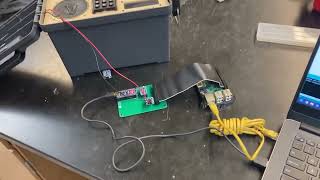
在此演示中,Arduino IDE 用于将文本数据发送到板载 Arduino Nano 上的串行端口。
视频示例

物料清单
| 部分 | 姓名 | 问 | $/个 | 网址 |
|---|---|---|---|---|
| A1 | Arduino Nano | 1 | 24.90 | https://www.digikey.com/short/v8cmbt7m |
| A1 | 1x20 母头引脚 | 2 | 0.98 | https://www.digikey.com/short/4h4njfbf |
| C1、C2 | 10 uF表面贴装电容器 | 2 | 0.56 | https://www.digikey.com/short/qfrbqfhd |
| J1 | 1x10 母头引脚(90 度) | 1 | 0.79 | https://www.digikey.com/short/23bfwwjh |
| J2 | 1x20 公头引脚 | 2 | 0.90 | https://www.digikey.com/short/597z5m75 |
| U1 | Adafruit 电平转换器 | 1 | 3.95 | https://www.adafruit.com/product/757 |
| U2 | Adafruit I2S Amp | 1 | 5.95 | https://www.adafruit.com/product/3006 |
| U1、U2 | 1x10 母头引脚 | 3 | 0.70 | https://www.digikey.com/short/0927z9wq |
| 不适用 | Adafruit GPIO 带状电缆 | 1 | 2.95 | https://www.adafruit.com/product/1988 |
| 不适用 | Raspberry Pi 或兼容设备 | 1 | 69.99 | https://www.amazon.com/dp/B00T2U7R7I/ |
画廊
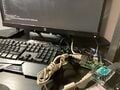 用于了解 Arduino-Pi 串行通信的测试设置
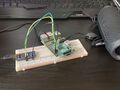 另一个正在开发中的模型
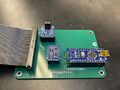
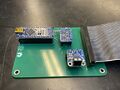 最终切片 PCB 的正面图
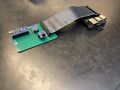
 最终切片 PCB 的背面视图
 最后一块 PCB 连接到 Raspberry Pi B+


有用的资源
使用的开源库/资源:
在开发过程中,我收藏了所有我觉得有用的网站、论坛、教程、视频等等。下面是这份列表的精简版。
2022 年 1 月至 5 月:设备设置和通信软件开发
- http://espeak.sourceforge.net/
- https://wiki.freepascal.org/espeak
- https://yantraas.com/send-sensor-data-from-arduino-to-raspberry-pi/
- https://www.instructables.com/Raspberry-Pi-Arduino-Serial-Communication/
- https://roboticsbackend.com/raspberry-pi-arduino-serial-communication/。
- https://www.cyberciti.biz/faq/find-out-linux-serial-ports-with-setserial/
- https://www.circuitbasics.com/how-to-play-audio-with-the-raspberry-pi/
- https://forums.raspberrypi.com/viewtopic.php?t=92096
- https://raspberrypi.stackexchange.com/questions/101932/i-cant-get-the-osd-with-omxplayer
- https://www.dexterindustries.com/howto/make-your-raspberry-pi-speak/
- https://www.reddit.com/r/raspberry_pi/comments/dzszrb/omxplayer_and_subtitles_is_unable_to_open_font/
- https://www.tomshardware.com/reviews/raspberry-pi-headless-setup-how-to,6028.html
- https://raspberrypi.stackexchange.com/questions/22708/is-there-some-trick-to-getting-aplay-audio-output-working
- https://forums.raspberrypi.com/viewtopic.php?t=241397
- https://quick-adviser.com/how-do-i-change-the-default-audio-device-on-raspberry-pi/
- https://forums.raspberrypi.com/viewtopic.php?t=47942
- https://www.geeksforgeeks.org/aplay-command-in-linux-with-examples/
- https://www.youtube.com/watch?v=RkQbK9ek59c
- https://learn.adafruit.com/adafruits-raspberry-pi-lesson-4-gpio-setup/configuring-i2c
- https://raspberry-projects.com/pi/programming-in-python/i2c-programming-in-python/using-the-i2c-interface-2
- https://pypi.org/project/smbus2/
- https://forums.raspberrypi.com/viewtopic.php?t=115080
- https://forums.raspberrypi.com/viewtopic.php?t=125470
- https://forums.raspberrypi.com/viewtopic.php?f=28&t=97314
- https://stackoverflow.com/questions/983354/how-to-make-a-python-script-wait-for-a-pressed-key
- https://buildmedia.readthedocs.org/media/pdf/smbus2/latest/smbus2.pdf
- https://raspberrypi.stackexchange.com/questions/62206/sending-and-receiving-string-data-between-arduino-and-raspberry-pi-using-the-i2c
2023 年 1 月至 5 月:PCB 开发和概念验证代码
- https://www.adafruit.com/product/3006
- https://www.adafruit.com/product/1988
- https://www.adafruit.com/product/757
- https://osf.io/u2h4g/
- https://pypi.org/project/spidev/
- https://learn.adafruit.com/adafruit-max98357-i2s-class-d-mono-amp
- https://pythonprogramminglanguage.com/text-to-speech/
- https://stackoverflow.com/questions/43052374/can-not-import-espeak
- https://forums.raspberrypi.com/viewtopic.php?t=248280
- https://www.build-electronic-circuits.com/kicad-tutorial/
- https://roboticsbackend.com/raspberry-pi-master-arduino-uno-slave-spi-communication-with-wiringpi/
- https://www.protoexpress.com/blog/pcb-footprint-creation-allegro-altium-designer-kicad/
- https://www.protoexpress.com/blog/how-to-create-a-schematic-and-symbol-library-kicad/
- https://www.baldengineer.com/custom-kicad-schematic-symbol.html
- http://robotics.hobbizine.com/raspiduino.html
- https://learn.sparkfun.com/tutorials/raspberry-pi-spi-and-i2c-tutorial/all
- http://www.penguintutor.com/electronics/rpi-arduino-spi
- https://medium.com/geekculture/raspberry-pi-python-libraries-for-i2c-spi-uart-3df092aeda42
- https://www.arduino.cc/reference/en/language/variables/data-types/stringobject/
- https://www.arduino.cc/reference/en/language/functions/communication/serial/
下载
该项目文件的下载,包括文档、硬件和固件,可以在项目的OSF 存储库中找到。