


StartUp Humboldt Titan plaques

| Type | Plaque |
|---|---|
| Authors | Dante Cross Sean Harwood Eduardo Mendoza Andrew Swinney |
| Location | Arcata, United States |
| Status | Verified |
| Made | Yes |
| Replicated | No |
| Uses | Display |

The StartUp Humboldt Titan Level Sponsorship Plaques project was given to Lost Coast Redworks, a student design team enrolled in Engineering 205 in the Fall of 2025 at Cal Poly Humboldt. The purpose of this project was to create a way to show recognition to sponsors to the StartUp Humboldt Competition that provided substantial financial support.
Background
[edit | edit source]

- Cal Poly Humboldt is a University in Northern California that is right in the heart of the Redwood Coast, sometimes known as the "Lost Coast" and within this community a group of people known as StartUp Humboldt put together a Business Competition for local businesses and entrepreneurs to engage with the community and receive funding.
- The semester long design project that Lost Coast Redworks took on was a way to provide recognition to "Titan Level Sponsors" which are sponsors who donate over $25,000 to the StartUp Humboldt Competition.
- The suggested method to do this was to create sponsorship plaques with almost total creative control for the whole project.
- Lost Coast Redworks settled on the method of creating a Polyptych design as they believed that would be the best way to provide recognition to sponsors, collaborate all of their ideas, and utilize the tools that the Engineering Department could provide for them.
- The goal was to create plaques that made the sponsors feel more rewarded for their donations, just past the feeling of supporting the growth of Humboldt County, and make the recipients feel as if they were receiving a worthwhile product.
Problem statement
[edit | edit source]The objective of this project was to create a physical representation of gratitude to the Titan Level Sponsors of the StartUp Humboldt Competition.
Criteria
[edit | edit source]The list of criteria was created during the team's meetings, with and without the client, as the client provided little in the sense of given requirements.
| Criteria | Description | Weight (1-10) |
|---|---|---|
| Aesthetic | The final design of the plaques had to represent the surrounding flora and fauna of Humboldt County and fit the area well. | 10 |
| Time | A final design was chosen that could be completed at the highest quality before the deadline was hit. | 10 |
| Mass | To provide a product that would be easily moved and mounted, a set maximum weight of five pounds was put in place to prevent a product that was too heavy. | 8 |
| Size | For the connivence of the recipient, the total surface area was set to 240 in2 at the largest and 88 in2 at the smallest. This set surface area range ensured a plaque that was not too small, to the point it feels unsubstantial, and not too large, to the point it is unable to be displayed comfortably. | 8 |
| Text | The actual text of the plaque was set to be big enough to read from inside the same room the plaque was displayed inside of so those viewing it would not have to read it from directly in front of it. | 7 |
| Percent Wood | The goal was to make the plaques greater than 50% wood as they believed that having a majority wooden product would provide the best end product. | 7 |
| Cost | It was a goal of theirs to make each plaque less than $51 to stick to a fairly strict total project budget of $200. | 2 |
Prototyping
[edit | edit source]The initial prototype that was produced was a testing of the laser on a scrap piece of wood.

The following prototype was 3D Print of a topographical map of the Eureka Bay as this was a shape that would be used on one of the plaques.

Continuing, the next prototype was the use of Keyhole Router Bits to cut out tracks for a designed folding mechanism that would allow the plaques to sit on a desk and mount on a wall.

Furthermore, they created a template for the River Plaque to test out the CNC and see how it performed with their design.

Next was the prototype for the "Back in Plaque" design which was the folding back design for each plaque. After doing a test on the to-scale plaques it was determined that the folding back design was not viable and the only included back design would be the keyholes, then later the felt.

The final prototype that Lost Coast Redworks produced was a full mock-up of one of the plaque designs. A piece of 3/4" redwood was used and it was laser engraved as well as using a router to bevel the edge around the whole plaque.


Final product
[edit | edit source]After the prototyping process, Lost Coast Redworks reused these designs on a larger scale redwood pieces. After the designs were translated using CNC and laser engraving, the wood was sealed using polyacrylic clear-coat for a sleek and professional-looking coat. Black felt was also cut and applied to the backside using spray adhesive. Lost Coast Redworks then used a CNC router to cut out a brass nameplate; the center portion of this brass would be left blank so that it may be later cut with the names of StartUp Humboldt's Titan-level sponsors.
The first completed plaque was the one depicting Humboldt County's Mad River as displayed in the image on the right. Resin samples with green and blue dye were determined to depict its natural color best. Sealant was applied after the resin had time to cast properly.
The following two completed plaques were lasered engraved as shown below in the Lasered Trees and in the Trees & Waves plaques.


The final plaque created was the Eureka Bay Topographical map as seen to the right.
Overall, Lost Coast Redworks produced four high quality redwood plaques with a brass faceplate, each representing Humboldt County's flora and fauna. Seen below are all four plaques put together in their final "Polyptych" form.
Construction
[edit | edit source]Plaque templates were cut from a 12" width x 12" length of 1" thick redwood heart from Almquist Lumber Yard.
Laser
[edit | edit source]Out of the four plaques, two would be laser engraved with the designs created by Lost Coast Redworks. When lasering, they made sure that the laser would engrave with the grain, not against it, as during their tests they determined this would create the best final product.
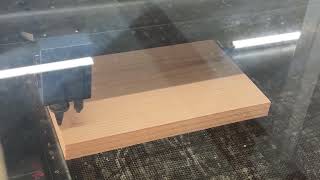
Cutting the Shape
[edit | edit source]Two of the plaques were cut to shape and were cut to follow the shape of the engraving.
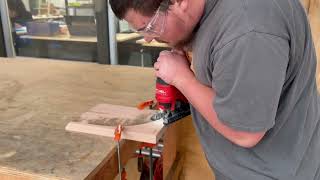
Beveled Edge
[edit | edit source]After Lost Coast Redworks engraved these designs, they used a router table to bevel the edges of the plaques.
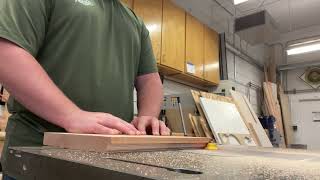
Keyholes
[edit | edit source]Following the beveled edges, the keyholes were added to the back of the plaques, for the epoxy river plaque it was given a single keyhole as it was a symmetrical shape, but the other three plaques got double keyholes, on the same horizontal plane for ease of mounting.

Sanding
[edit | edit source]Before getting lasered or put into the CNC, each board was sanded with 120 grit, 180 grit, then 220 grit sandpaper evenly. This provided a clean surface for the laser and CNC to work on and ensure a good looking final product.
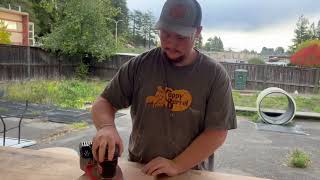
CNC (Redwood)
[edit | edit source]The first plaque that entered the CNC was the Epoxy River Plaque. The CNC cut pocket for the brass faceplate and then the channels for the epoxy rivers. Finally, the CNC mill cut the overall shape of the plaque. All three operations for this plaque used a 1/4" roughing endmill.
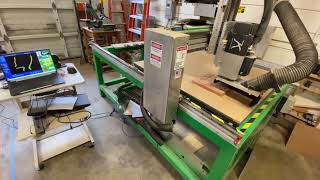
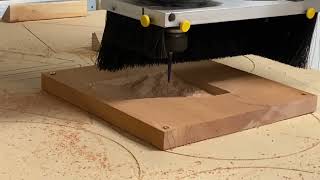
The second plaque that entered the CNC was the Topographical Map Plaque. The Forest Scientific CNC router cut the topographical map with a 1/4" roughing bit that was the same one used for the Mad River plaque. This roughing bit cleared away most of the excess material, allowing the ATC (Automatic Tool Changer) to switch to a finer bit with a 1/8”Diameter at the tip, with a 1.5” flutes taper to 0.25” shank to make the details come to life. The final operation switched back to the 1/4" roughing bit to cut out the contour of the plaque.
Epoxy
[edit | edit source]For the river plaque, epoxy was used to give the look of a river running through the plaque. The painters tape was used to seal each end of the river, the open ends of the channels, and a two part epoxy mixture was used, along with dyes, were poured into the channels and left to set for 24 hours. The epoxy was overfilled to ensure there would be an even looking final product.

After the epoxy fully cured, about 24 hours later, a router jig was set up as seen in the image below to bring the epoxy layer down to the level of the wooden plaque.

CNC (Brass)
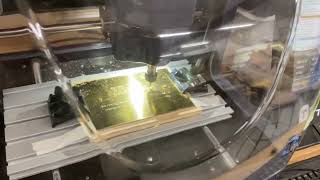
[edit | edit source]Each Brass Faceplate was engraved in a smaller CNC as seen below. First operation was to engrave the brass with a 1/8" diameter ball nose bit, run twice for cleaning the engraving. Next, a flat endmill 1/8" diameter endmill was used to bore a hole into mounting screw locations. Finally, the same 1/8" diameter endmill was used to cut out the contour of the faceplate.
Clear Coat
[edit | edit source]Each plaque got three layers of clear coat applied to it, waiting 2 hours between each layer and sanding at 220 grit between the layers.


Felt
[edit | edit source]Applied to the backs of each plaque is a layer of black felt, this felt is intended to provide a nice finished look as well as adding an extra layer of protection to the walls that they will be mounted to.

Polishing Brass
[edit | edit source]The final step in construction was to polish all of the brass plates to give them a much cleaner look. This was done with a soft toothbrush and Brass Polish.

Here is a step-by-step guide to create the plaques...
Bill of materials
[edit | edit source]The Cal Poly Humboldt Makerspace provided $200 total for the project while the rest would be put up by Lost Coast Redworks.
| Item | Amount | Cost per unit | Total |
|---|---|---|---|
| Brass Plate — 4 x 6 plates of Brass for engraving, 2mm thick | 4 | USD 19.47 | USD 77.88 |
| Redwood (Final) — 1" thick...12" wide...5' long | 1 | USD 37.95 | USD 37.95 |
| Brass Hinges — 1" Brass hinges for folding mechanism on the back | 4 | USD 2.00 | USD 8.00 |
| Premium Black Felt — 12" x 18" squares from Michael's Crafts Store | 4 | USD 2.49 | USD 9.96 |
| Brass Polish — 1 bottle of Brasso Brass Polish | 1 | USD 6.59 | USD 6.59 |
| Epoxy — Epoxy part A and part B from Michaels | 1 | USD 20.00 | USD 20.00 |
| Epoxy Dyes — Dyes for the epoxy from Michaels | 1 | USD 8.00 | USD 8.00 |
| Spray on Adhesive — Gorilla Spray on Adhesive | 1 | USD 15.99 | USD 15.99 |
| Grand total | USD 184.37EUR 158.56 <br />GBP 134.59 <br />CAD 228.62 <br />MXN 3,844.11 <br />INR 13,800.09 <br /> | ||
Operation
[edit | edit source]The plaques designed by Lost Coast Redworks are outfitted with keyholes on their backside. These keyholes may be slotted over the heads of the provided screws as desired for hanging purposes. For a secure fit, it's recommended that the heads of these fasteners be slightly less than the diameter of the keyholes. For a step-by-step guide on mounting the plaques...follow this link to go to a video created by Lost Coast Redworks.
Maintenance
[edit | edit source]For the Sponsorship Plaques there is not much maintenance required. You may ask...
- Are there any needed actions for maintenance?
- How often?
- Who should perform maintenance?
Maintenance schedule
[edit | edit source]This sections shows when to maintain what.
- Daily
- No daily maintenance needed.
- Weekly
- If displayed in a dusty place, dust wood with a dry soft cloth and dust brass weekly, again with a soft toothbrush.
- Bi - Monthly
- Every two months, the usual dusting as well as polishing should be done to the brass, polish with a soft toothbrush and Brass Polish.
- Yearly
- No yearly maintenance.
Who can Perform the Maintenance?
[edit | edit source]Anybody can do it as long as the directions are followed on dusting and polishing materials.
Conclusion
[edit | edit source]Testing results
[edit | edit source]- From testing the keyhole bits as tracks there was a determination that the original folding design for the backs was not feasible.
- After testing different laser settings and going with/against the grain they determined that going with the grain on a specific setting would work the best.
Discussion
[edit | edit source]- For the tracks, the testing lead them to learn what to cut out and what not to cut out of their design and helped them streamline a simpler product.
- The testing conducted with the laser led them to create the best looking engraving on the wood, taking into account the behaviors that redwood has.
Lessons learned
[edit | edit source]- Learned how to better apply woodworking skills.
- Learning how to make a project with clients input in mind.
- Collaborating with teammates to make a product together and find a middle ground.
- Learned how to CNC machine in Fusion.
- Using isopropyl alcohol after laser engraving.
- Adapting to design changes.
- Ensure all design decisions are made before organizing machine time.
Next steps
[edit | edit source]- These plaques will be awarded in spring of 2026 in the StartUp Humboldt competition to the Titan Level Sponsors.
Troubleshooting
[edit | edit source]| Wood | |
|---|---|
| Problem | Solution |
| Dust | Wipe with a soft dry cloth |
| Yellowing | Keep out of sunlight, if needed sand down and reapply a clear coat |
| Brass | |
|---|---|
| Problem | Solution |
| Scratches/Dust | Wipe with a soft dry cloth, for deeper cleaning use a brass polish such as Brasso and a soft toothbrush |
Team
[edit | edit source]Lost Coast Redworks
[edit | edit source]- Dante Cross
- Sean Harwood
- Eduardo Mendoza
- Andrew Swinney
References
[edit | edit source]
| Authors | Dante Cross, Sean Harwood, Eduardo Mendoza, Andrew Swinney |
|---|---|
| License | CC-BY-SA-4.0 |
| Organizations | Cal Poly Humboldt, StartUp Humboldt |
| Cite as | Dante Cross, Sean Harwood, Eduardo Mendoza, Andrew Swinney (2025–2026). "StartUp Humboldt Titan plaques". Appropedia. Retrieved September 24, 2026. |