


Cosmos in the Stacks solar energy

| Type | Solar Energy |
|---|---|
| Authors | Sean Denery Henry Dernedde Ailor Gray Pablo Rodas |
| Location | Arcata, United States |
| Status | Deployed |
| Years | 2026 |
| Made | Yes |
| Replicated | No |
| Uses | education, science |
Our project is composed of a set of shelves with mini interactive exhibits on each shelf. We did most of the designing in building in the months of February - April 2026 and we hope our project inspires more people to learn and have an open mind to the wonders and sustainability solar energy provides.
Background
[edit | edit source]The purpose of this project was to make an interactive display for the Cal Poly Humboldt library. The interactive display is meant to educate the public on solar power. Our client is the Cal Poly Humboldt library, represented by the library dean Cyril Oberlander.
Problem statement
[edit | edit source]The objective of this project is to design, build, and test a solar panel engine that we will shine a light into, that will then connect to and activate for example a solar spinner. Though we won't be limited to just the spinner but various other options that we expect to be fun and engaging. We hope to make the exhibit as fun and interactive as possible while informing the users on how light is turned into energy that powers objects.
Criteria
[edit | edit source]The criteria and constraints are used to guide the design and set limits and priorities that need to be considered for the final project (0-10 highest).
| Criteria | Description | Weight (1-10) |
|---|---|---|
| Cost | Does not cost more than $450 | 10 |
| Safety | Follows school safety guidelines | 10 |
| Educational Value | The average user learns at least one thing | 8 |
| Aesthetic Appeal | Looks at least as visually pleasing as the simulation hall sandbox | 8 |
| Accessibility | Can be understood by 5th graders through adults | 7 |
| Durability | Can last 10+ years | 7 |
Prototyping
[edit | edit source]During our prototyping process we had to come up with ways to create a fun interactive display for all ages, while making it look as intriguing as possible to attract users. we also had to take into account that were budling it in a quite area for the library. So we came up with twelve ideas, Four ideas for each prototype. From there we would get feed back on each idea which significantly helped us in narrowing down what people would find most eye catching, And fun to interact with.
- Prototype gallery
-
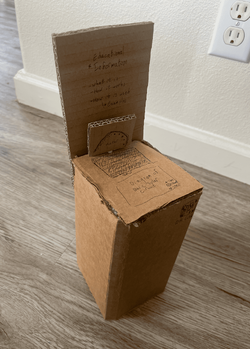 A Cardboard prototype
 -
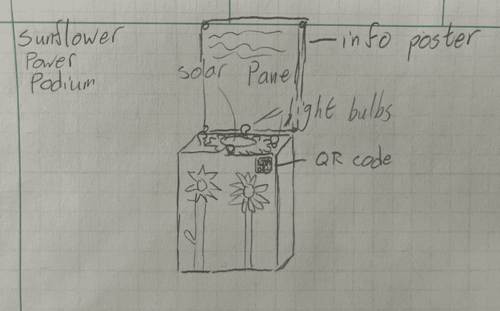 A drawn prototype by Ailor Gray, Sunflower Power Podium


Final product
[edit | edit source]The final product was a blue painted dictionary stand and a backboard to be displayed in the Cal Poly Humboldt Library. The backboard had information regarding the benefits and drawbacks of solar energy and how each component of a solar panel helped in the process of turning sunlight into electricity. The backboard has a solar panel in it that when shone with a chained on provided flashlight would cause a DC motor with four popsicle sticks glued to it to spin. On the top of the Dictionary stand there is a solar panel with two clamps, and a multimeter. When connected to the multimeter with the clamps, shining the flashlight on the top panel will show how voltage, or another possible measure on a multimeter, changes when the light hits it or leaves it. The final feature of the display is an interactive model of each of the five layers of a solar panel. Each layer is printed out using PLA filament and stored stacked on top of each other so it is more intuitive to understand how a solar panel is actually working.
Construction
[edit | edit source]


Bill of materials
[edit | edit source]In total the team spent roughly 97 dollars on the final project from purchasing a solar panel, backboard, multimeter, and finally a load tester. The main dictionary stand itself was donated graciously by the Cal Poly Humboldt Library.
| Item | Amount | Cost per unit | Total |
|---|---|---|---|
| Dictionary Stand | 1 | USD 0.00 | USD 0.00 |
| Backboard | 1 | USD 15.00 | USD 15.00 |
| Thunderbolt 7W Solar Panel | 1 | USD 30.00 | USD 30.00 |
| Garden Bender Multimeter | 1 | USD 27.00 | USD 27.00 |
| DROK USB Load Tester | 1 | USD 25.34 | USD 25.34 |
| Grand total | USD 97.34EUR 83.71 <br />GBP 71.06 <br />CAD 120.70 <br />MXN 2,029.54 <br />INR 7,285.90 <br /> | ||
Operation
[edit | edit source]This section depicts step by step on how to interact with the solar panel interactive display shelf in the cal poly humboldt library. The steps are in no particular order and you can feel free to explore them in your own order.
There should be a flashlight hanging on a chain on the left side of podium. Reach out and grab it without dropping it and hold it in your hand.
Turn on the hanging flashlight and hover it over of the top solar panel on the podium and take note what the panel does, it should display a number on the multimeter next to it.
Lift the flashlight up to the solar panel embedded on the backboard and look towards the second shelf to see what it does. When hovering over it the solar spinner on this shelf should start spinning around. Feel free to read the contents off of the backboard while shining the flashlight up here to inform yourself about solar energy.
After using the chained flashlight to interact with the two solar panels, carefully hang the flashlight on mounted screw eye in which the chain is hanging off of. The flashlight has a magnet on the back side of it so it is easily able to hang off the metallic screw eye.
Carefully handle and observe the 3D printed solar panel components in the container on the second shelf. Each component says what it does in an actual solar panel with engraving.
Maintenance
[edit | edit source]The solar panel display in general needs pretty minimal maintenance. Its mostly the flashlight and multimeter that need semi-regular maintenance in regards to their batteries and even than its not a huge amount. The maintenance can be performed by anyone in the cal poly humboldt library staff and isn't a specialized expertise.
Maintenance schedule
[edit | edit source]This section explains how to regularly maintain the solar energy display which in general is very low maintenance.
- Weekly:
- Dust the shelf so there is no buildup over time
- Every 1/2 year:
- Change the batteries in the multimeter if dead
- Recharge the flashlight so it is not burnt out
Conclusion
[edit | edit source]Testing results
[edit | edit source]Discussion
[edit | edit source]To make sure everything worked well it was decided to test three main components of the solar energy display: the usability with a bulb, the solar panel itself, and usability of the multimeter. The bulb did not light up no matter how much we tried to get it brighten up due to it being an AC bulb and the LED grow light used to much power. Meanwhile the solar panel itself worked fine and no major issues arised. Finally the multimeter worked exceptionally well with the given solar panel.
Lessons learned
[edit | edit source]From the lightbulb testing it was learned that a DC lightbulb would need to be used to work with the DC solar panel that was purchased. Due to the grow light requiring too much power without being always plugged in it was tossed. From the multimeter testing that gave the ok that it would be a fine replacement for the initial light bulb planned.
Next steps
[edit | edit source]It is hoped that the display is regularly maintained so it lasts for up to 10 yrs as displayed in the criteria table to help educate the people about solar energy. Another hope for the project is that the information is kept up to date with new trends in solar energy as the decade progresses.
Team
[edit | edit source]Our team consists of four engineering students at Cal Poly Humboldt
- Henry Dernedde - Environmental Resources Engineering
- Pablo Rodas - Environmental Resources Engineering
- Ailor Gray- Energy Systems Engineering
- Sean Denery - Mechanical Engineering
References
[edit | edit source]
| License | CC-BY-SA-4.0 |
|---|---|
| Organizations | Cal Poly Humboldt |
| Cite as | Lonny Grafman, Sean, A Gray, Hvdernedde (2026). "Cosmos in the Stacks solar energy". Appropedia. Retrieved October 19, 2026. |