| Hardware license | CERN-OHL-S |
|---|---|
| Certifications | Start OSHWA certification |
Initial Power and Motor Current Adjustment
Double and triple check the wiring to ensure that the power wiring polarity is correct; continuity checks should be made before applying power. Correct wiring before proceeding.
Plug the 12V power supply into a wall outlet and, while watching the electronics, plug the barrel connector into the socket on the printer. If you notice smoke and/or hear snapping, unplug the connector as quickly as possible. Properly wired electronics will cause all four blue LEDs on one side of the Beaglebone Black to light up for a short time and then one will flash to the rhythm of a heartbeat. No LEDs will light on the Melzi.
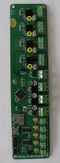
With the positive probe on the top of the pot and the negative probe touching the sd card holder, adjust the X, Y and X motor pots until 420 - 450mV is measured. The E-MOTOR should be set to 550V.]] With a small screwdriver and a voltmeter set for millivolt readings (400mV - 2V), adjust each of the small potentiometers on the Melzi for X, Y and Z to produce a potential of 420 - 450 mV measured between ground (the micro SD card holder can be used for ground) and the screwdriver used to adjust the potentiometer (see photo). The E-MOTOR should be set to 550mV. Two sets of hands simplifies the task. Be careful to not short anything on the Melzi with the screw driver or voltmeter probe.
Franklin is software designed to work with all 3-D personal manufacturing robots like Athena. It is both server and firmware, exposing all settings and controls on a web page served by the host computer, which in the case of Athena, is the Beaglebone Green.


The firmware is now loaded, but the printer is uncalibrated and will not print properly. Complete setup as described, below.
Values in Franklin are presented with an input text box for making changes. The currently active value is shown next to the box.
Those text boxes permit entry of a value which is then set by pressing the "Enter" key on the keyboard. Values can also be changed by selecting a text box (left click on it) followed by pressing cursor up and down movement keys on the key board:
Math can also be performed in the text boxes; entering +1.5 (note plus sign) will add 1.5 to the value, entering +-1.5 (note the plus and the minus signs) will subtract 1.5 from the value.
All values of the same type can be changed at once by making the change in the maroon bar below the values.
Pressing enter on an empty box is the same as entering 0. Setting a value to something that Franklin cannot understand as a number sets it to NaN ("Not a Number"). For some settings, this is useful; for example, a temperature control is switched off that way.
The special values Infinity and -Infinity can also be entered (note the capital I), which is useful for some settings.

Because the Beaglebone is a computer, it should be shut down in a controlled way. There is a web interface for doing this at http://192.168.76.2/cgi-bin/shutdown . When clicking the button on that page, the machine will shut down. It normally responds with an error that the host is unreachable, that means it shut down before the response was sent, so that means it worked.
To power it back up, the power must be disconnected, and plugged back in.
The Athena does not use much power while it is idle, so it is not required to turn it off very often. This means it is easy to forget the shutdown link, so it is a good idea to bookmark it along with the Franklin link given below.
| License | CC-BY-SA-3.0 |
|---|---|
| Cite as | Gcanzalo, Wijnen (2016–2025). "Athena Franklin". Appropedia. Retrieved October 3, 2026. |